

#
国际化 (i18n)
SillyTavern 支持多种语言。本指南解释如何添加和管理翻译。
您来到这里可能是因为某些文本在您的语言中未被翻译,这让您感到烦恼。首先我将向您展示我如何修复中文(繁体)语言环境中一些缺失的翻译。每个缺失的翻译都有不同的原因,因此您将很好地了解如何修复自己的缺失翻译。
在第二部分,我们将了解
i18n 在 SillyTavern 中如何工作 ,编写翻译 和使用它们的代码,- 调试函数以
查找缺失的翻译 , - 添加
新语言 , - 以及
贡献您的更改 。
如果您正在开发扩展或修改核心代码,请在编写 HTML 和 JavaScript 时牢记 i18n。这样,您的工作就可以为其他人翻译成他们的语言做好准备。
没有人自己知道 15 种语言。我们共同努力使 SillyTavern 对每个人都可以访问。
世界上每个人都应该能够在手机和计算机上使用自己的语言。
#
让我们修复一些缺失的翻译!
所有这 3 个问题都需要代码更改来修复。如果您要添加新的翻译,您可能根本不需要接触代码。只需将翻译添加到 JSON 文件中即可。碰巧的是,有人最近向中文(繁体)JSON 文件添加了大量缺失的翻译,因此剩余的问题都在代码中。在其他语言环境中,有很多缺失的翻译您可以在不接触代码的情况下修复。
#
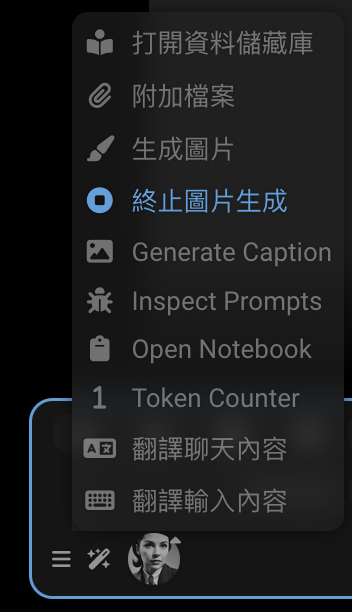
Generate Image
文本"Generate Image"在中文(繁体)语言环境中未被翻译。为什么?
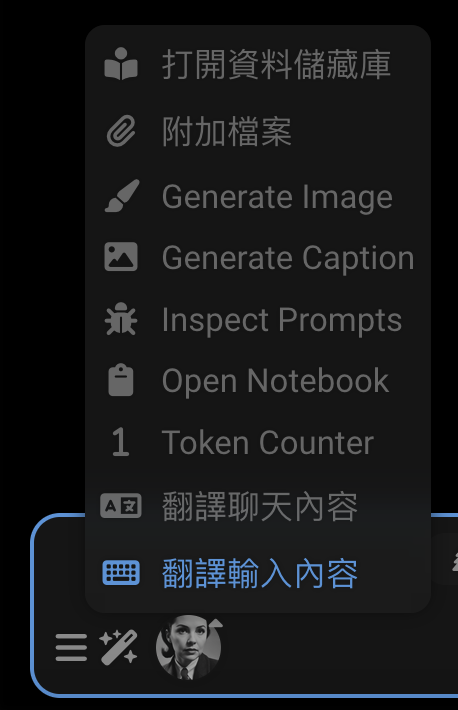
右键单击该元素并检查它。您将看到 HTML:
<!--渲染的 HTML-->
<div class="list-group-item flex-container flexGap5 interactable" id="sd_gen" tabindex="0">
    <div data-i18n="[title]Trigger Stable Diffusion" title="觸發 Stable Diffusion"
         class="fa-solid fa-paintbrush extensionsMenuExtensionButton"></div>
    <span>Generate Image</span>
</div>
它的 data-i18n 属性在哪里?它缺失了!让我们添加它。我们在源代码中找到它:
<!--public/scripts/extensions/stable-diffusion/button.html-->
<div id="sd_gen" class="list-group-item flex-container flexGap5">
    <div class="fa-solid fa-paintbrush extensionsMenuExtensionButton" title="Trigger Stable Diffusion"
         data-i18n="[title]Trigger Stable Diffusion"></div>
    <span>Generate Image</span>
</div>
<div id="sd_stop_gen" class="list-group-item flex-container flexGap5">
    <div class="fa-solid fa-circle-stop extensionsMenuExtensionButton" title="Abort current image generation task"
         data-i18n="[title]Abort current image generation task"></div>
    <span>Stop Image Generation</span>
</div>
我们很幸运,字符串 Generate Image 在许多语言文件中,包括中文(繁体)。
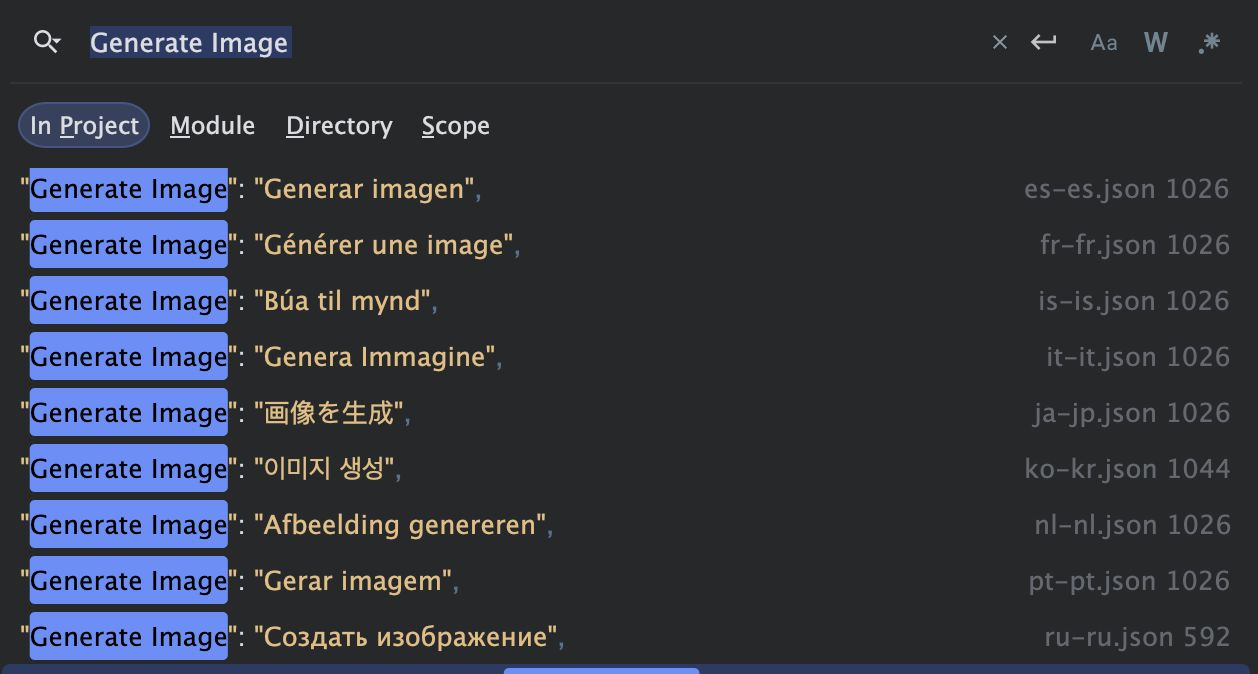
{
    "Generate Image": "生成图片"
}
为什么它没有显示?我们必须正确连接元素:
<!--public/scripts/extensions/stable-diffusion/button.html-->
<div id="sd_gen" class="list-group-item flex-container flexGap5">
    <div class="fa-solid fa-paintbrush extensionsMenuExtensionButton" title="Trigger Stable Diffusion"
         data-i18n="[title]Trigger Stable Diffusion"></div>
    <span data-i18n="Generate Image">Generate Image</span>
</div>
<div id="sd_stop_gen" class="list-group-item flex-container flexGap5">
    <div class="fa-solid fa-circle-stop extensionsMenuExtensionButton" title="Abort current image generation task"
         data-i18n="[title]Abort current image generation task"></div>
    <span>Stop Image Generation</span>
</div>
现在它起作用了!重新加载页面并查看。
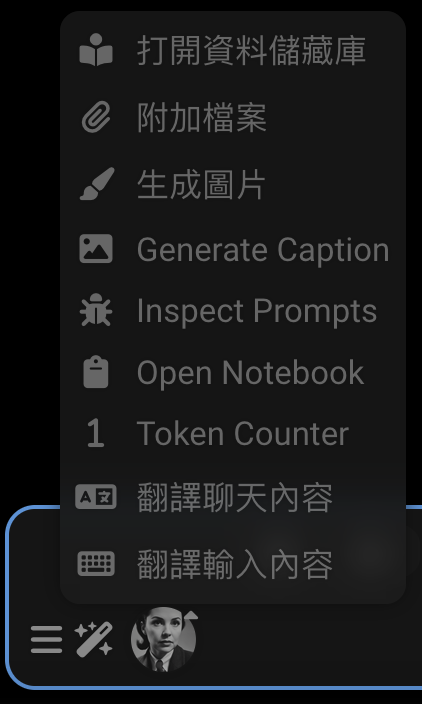
但是当我们打开 HTML 时,它下面的 Stop Image Generation 怎么样?HTML 看起来不对。
如果我们生成图像然后在生成时打开魔杖菜单,我们会看到未翻译的文本。
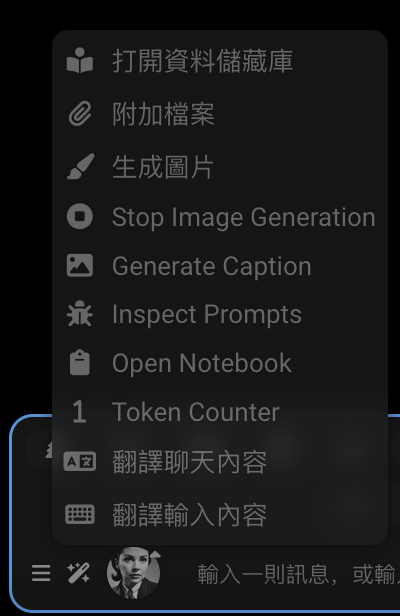
首先修复 HTML:
<!--public/scripts/extensions/stable-diffusion/button.html-->
<div id="sd_gen" class="list-group-item flex-container flexGap5">
    <div class="fa-solid fa-paintbrush extensionsMenuExtensionButton" title="Trigger Stable Diffusion"
         data-i18n="[title]Trigger Stable Diffusion"></div>
    <span data-i18n="Generate Image">Generate Image</span>
</div>
<div id="sd_stop_gen" class="list-group-item flex-container flexGap5">
    <div class="fa-solid fa-circle-stop extensionsMenuExtensionButton" title="Abort current image generation task"
         data-i18n="[title]Abort current image generation task"></div>
    <span data-i18n="Stop Image Generation">Stop Image Generation</span>
</div>
这不足以修复问题。中文(繁体)文件中没有"Stop Image Generation"的翻译。我们可以添加它!这是一个可能的翻译:
{
    "Stop Image Generation": "停止生成图片"
}
...我们可以将其添加到 JSON 文件中"Generate Image"翻译之后。
{
    "Generate Image": "生成图片",
    "Stop Image Generation": "停止生成图片"
}
在与 Claude 讨论后,我们实际上将使用以下翻译:
- 繁体中文:"Stop Image Generation": "終止圖片生成"
- 简体中文:"Stop Image Generation": "中止图像生成"
- 日语:"Stop Image Generation": "画像生成を停止"
#
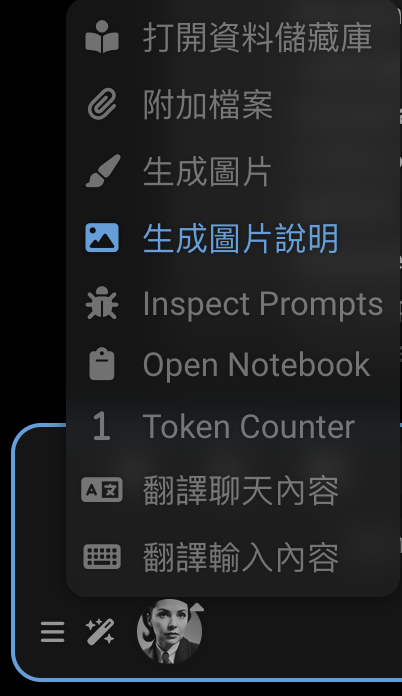
Generate Caption
"Generate Caption"在中文(繁体)语言环境中未被翻译。让我们修复它!
它在哪里?检查该元素。
<!--渲染的 HTML-->
<div id="send_picture" class="list-group-item flex-container flexGap5 interactable" tabindex="0">
    <div class="fa-solid fa-image extensionsMenuExtensionButton"></div>
    Generate Caption
</div>
原来这个 HTML 是由 JavaScript 生成的。让我们找到源代码。
// public/scripts/extensions/caption/index.js
const sendButton = $(`
        <div id="send_picture" class="list-group-item flex-container flexGap5">
            <div class="fa-solid fa-image extensionsMenuExtensionButton"></div>
            Generate Caption
        </div>`);
我们首先必须修复代码:
// public/scripts/extensions/caption/index.js
const sendButton = $(`
        <div id="send_picture" class="list-group-item flex-container flexGap5">
            <div class="fa-solid fa-image extensionsMenuExtensionButton"></div>
            <span data-i18n="Generate Caption">Generate Caption</span>
        </div>`);
中文(繁体)文件中也没有"Generate Caption"的翻译。让我们添加它!
{
    "Generate Caption": "生成圖片說明"
}
我们将使用以下翻译:
- 繁体中文:"Generate Caption": "生成圖片說明"
- 简体中文:"Generate Caption": "生成图片说明"
- 日语:"Generate Caption": "画像説明を生成"
#
Inspect Prompts
文本"Inspect Prompts"在中文(繁体)语言环境中未被翻译。为什么? 这个有点复杂。文本是由 JavaScript 生成的,翻译缺失。
// Extension-PromptInspector/index.js
const enabledText = 'Stop Inspecting';
const disabledText = 'Inspect Prompts';
嗯,您不知道吗...这两个短语都不在 i18n 文件中。让我们添加它们。
{
    "Stop Inspecting": "停止檢查",
    "Inspect Prompts": "檢查提示"
}
现在我们必须修复 JavaScript 代码。它必须使用 t 函数来获取翻译。
// Extension-PromptInspector/index.js
import {t} from '../../../i18n.js';

const enabledText = t`Stop Inspecting`;
const disabledText = t`Inspect Prompts`;
我们从 Claude 得到了这些建议。保留字符串,忽略代码。它们必须添加到 JSON 文件中。
// 1. 简体中文 (zh-cn):
const enabledText = t`停止检查`;
const disabledText = t`检查提示词`;
// 2. 繁体中文 (zh-tw):
const enabledText = t`停止檢查`;
const disabledText = t`檢查提示詞`;
// 3. 日语 (ja-jp):
const enabledText = t`検査を停止`;
const disabledText = t`プロンプトを検査`;
我们将把它们合并到 JSON 文件中。
{
    "Stop Inspecting": "停止检查",
    "Inspect Prompts": "检查提示词"
}
{
"Stop Inspecting": "停止檢查",
"Inspect Prompts": "檢查提示詞"
}{
"Stop Inspecting": "検査を停止",
"Inspect Prompts": "プロンプトを検査"
}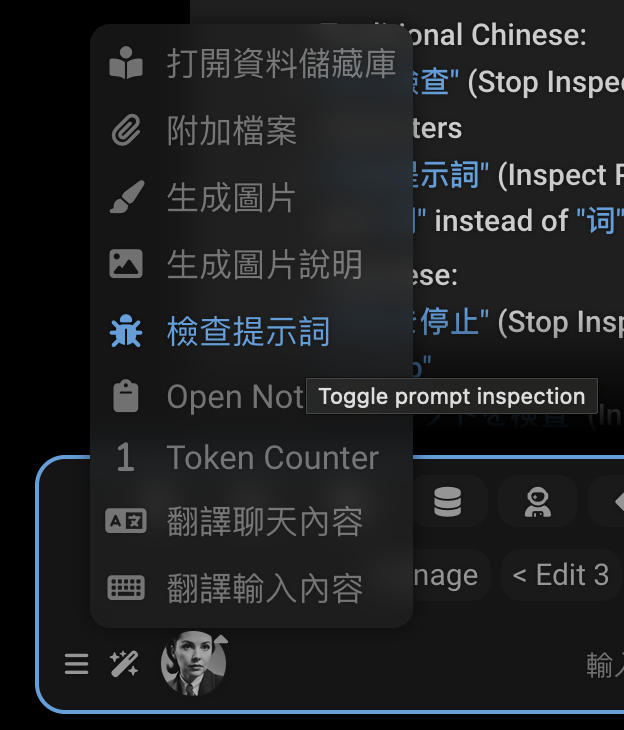
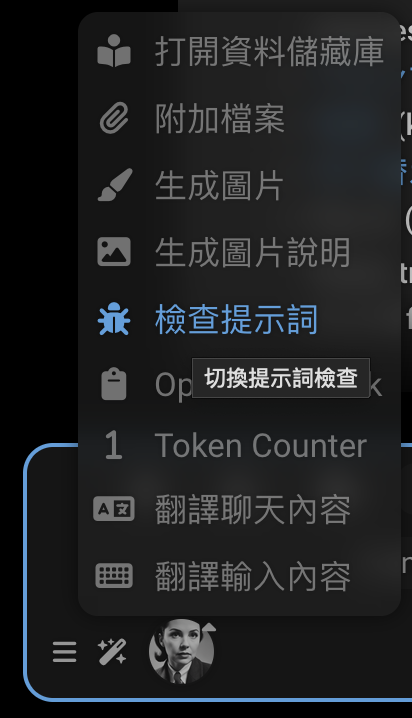
关于那个工具提示很遗憾。问题是代码没有使用
t 函数。
launchButton.title = 'Toggle prompt inspection';我们必须在扩展代码中修复它。
launchButton.title = t`Toggle prompt inspection`;我们还需要将翻译添加到 JSON 文件中。
{
    "Toggle prompt inspection": "切换提示检查"
}
{
"Toggle prompt inspection": "切换提示词检查"
}{
"Toggle prompt inspection": "プロンプト検査の切り替え"
}Prompt inspector 是一个单独的扩展,因此我们将代码修复 PR 到该 仓库:https://github.com/SillyTavern/Extension-PromptInspector/pull/1
翻译将添加到主 SillyTavern 仓库。https://github.com/SillyTavern/SillyTavern/pull/3198
#
Language files
Each language has a JSON file in public/locales/ named with its language code (e.g., ru-ru.json).
The file contains key-value pairs where:
- Keys are either the original English text or unique identifiers
- Values are the translated text
Example:
{
    "Save": "Сохранить",
    "Cancel": "Отмена",
    "Could not find proxy with name '${0}'": "Не удалось найти прокси с названием '${0}'"
}
#
How translations work
There are two ways translations are used in the application:
HTML Elements: Using
data-i18nattributes<div data-i18n="some_key">Default Text</div>The default text in the HTML will be replaced with the translated text if available.
Template Strings: In the JavaScript code using the
tfunctiont`Some text with ${variable}`These strings should be translated keeping the
${0},${1}, etc. placeholders intact.
SillyTavern uses HTML elements with data-i18n attributes to mark translatable content. There are several ways to use
this:
#
1. Translating Element Text
For simple text content:
<span data-i18n="Role:">Role:</span>{
"Role:": "Роль:"
}This replaces the element's text content with the translation of "Role:".
#
2. Translating Attributes
To translate an attribute like a title or placeholder:
<a class="menu_button fa-chain fa-solid fa-fw"
   title="Insert prompt"
   data-i18n="[title]Insert prompt"></a>
{
"Insert prompt": "Вставить промпт"
}The [title] prefix indicates which attribute to translate. The rest of the attribute value is the text that will
be used as a lookup key in the JSON file. It is common for coders to use the English text as the key, but it is not
required. The key can be any unique identifier.
The original English text must be present in the corresponding attribute (title="Insert prompt") though. It's used as
a fallback if the translation is missing. Most notably, there is no translation file for English.
Here is an example of using a unique identifier no_items_text as the key, rather than the English text:
<!--suppress HtmlUnknownAttribute -->
<div class="openai_logit_bias_list" no_items_text="No items"
     data-i18n="[no_items_text]openai_logit_bias_no_items"></div>
{
"openai_logit_bias_no_items": "没有相关产品"
}
#
3. Multiple Translations Per Element
Some elements need both content and attribute translations, separated by semicolons. The most common pattern is translating both the element's text content and its title attribute:
<div data-source="openrouter" class="menu_button menu_button_icon openrouter_authorize"
     title="Get your OpenRouter API token using OAuth flow. You will be redirected to openrouter.ai"
     data-i18n="Authorize;[title]Get your OpenRouter API token using OAuth flow. You will be redirected to openrouter.ai">
    Authorize
</div>
{
"Authorize": "Авторизоваться",
"Get your OpenRouter API token using OAuth flow. You will be redirected to openrouter.ai": "Получите свой OpenRouter API токен используя OAuth. У вас будет открыта вкладка openrouter.ai"
}This translates:
- The element's text content using the key "Authorize"
- The title attribute using the key "Get your OpenRouter API token using OAuth flow. You will be redirected to openrouter.ai"
Note that both the title attribute and the element's text content are provided in English as fallbacks.
You can also translate multiple attributes:
<!--suppress HtmlUnknownAttribute -->
<textarea id="send_textarea" name="text" class="mdHotkeys"
          data-i18n="[no_connection_text]Not connected to API!;[connected_text]Type a message, or /? for help"
          placeholder="Not connected to API!"
          no_connection_text="Not connected to API!"
          connected_text="Type a message, or /? for help"></textarea>
The corresponding translations in your language file would look like:
{
    "Not connected to API!": "Нет соединения с API!",
    "Type a message, or /? for help": "Введите сообщение или /? для помощи"
}
When the page loads, the system:
- Finds all elements with
data-i18nattributes - Parses any attribute prefixes like
[title]or[placeholder] - Looks up each key in your language's JSON file
- Replaces the element's content or attributes with the translated text
#
Dynamic Text
For dynamic text in JavaScript code, translations use either:
Template literals with the
tfunction:toastr.warn(t`Tag ${tagName} not found.`);Direct translation function:
translate("Some text", "optional_key")
#
Variable Placeholders
Some strings contain placeholders for dynamic values using ${0}, ${1}, etc:
toastr.error(t`Could not find proxy with name '${presetName}'`);{
"Could not find proxy with name '${0}'": "Не удалось найти прокси с названием '${0}'"
}Keep the placeholders the same for key and translation. The system will replace ${0} with the value of presetName, etc.
#
Finding missing translations
Let's say you don't just want to fix one annoying missing translation, you want to find them all.
That's a big ambition! Even fixing one translation is worth it. But if you want to catch 'em all, you need a tool.
#
SillyTavern-i18n
https://github.com/SillyTavern/SillyTavern-i18n
Tools for working with frontend localization files.
Features:
- Automatically add new keys to translate from HTML files.
- Prune missing keys from localization files.
- Use automatic Google translation to auto-populate missing values.
- Sort JSON files by keys.
#
Inbuilt debug functions
These are under User Settings > Debug Menu.
#
Get missing translations
Detects missing localization data in the current locale and dumps the data into the browser console. If the current locale is English, searches all other locales.
The console will show a table of missing translations with:
- key: The text or identifier needing translation
- language: Your current language code
- value: The English text to translate
#
Apply locale
Reapplies the currently selected locale to the page
Neither of these tools are perfect
- they don't catch missing translations in JavaScript code
- they don't catch missing data-i18n attributes in HTML, they just catch untranslated keys
- there are bugs in the code for
getMissingTranslations: keys should not be prefixed with[title]or[placeholder]
#
Adding a new language
To add support for a new language:
Add your language to
public/locales/lang.json:{ "lang": "xx-xx", "display": "Language Name (English Name)" }Create
public/locales/xx-xx.jsonwith your translations
#
Contributing
When your translations are ready:
- Verify your JSON file is valid
- Test thoroughly in the application
- Submit via GitHub pull request